1. Go to the Randolph-Macon College’s “Welcome to Online Services” landing page by using the following link: https://bachelor.accessiblelearning.com/RMC/ Enter the same RMC credentials used to check your student email account or log in to a computer on campus. Include “@go.rmc.edu” when entering your username.

Randolph-Macon College login page featuring a building with pink flowers on the left. On the right, easily access sign-in fields for email and password to request Letters of Accommodation through your DSO portal.

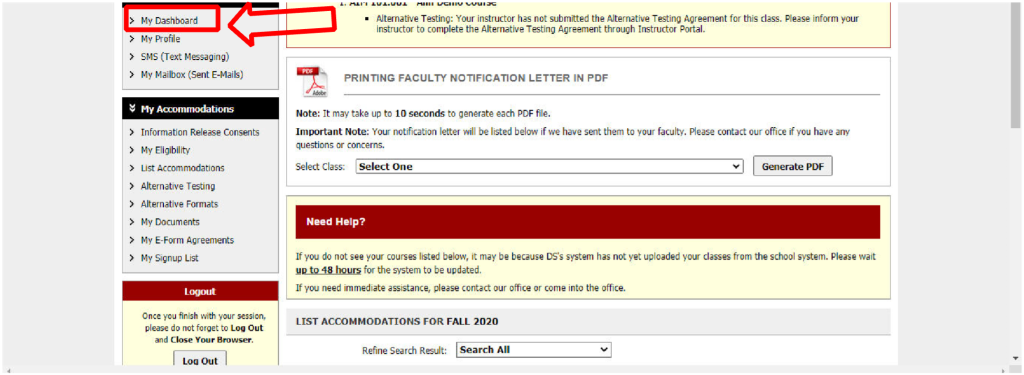
2. Once logged in, you should be directed to your Dashboard that provides an overview of your account.  Click on “My Dashboard” on the left side if you navigate away from the Dashboard and need to return to it.  

Screenshot of a user interface displaying sidebar navigation and a section for generating a printing faculty notification letter in PDF format, featuring options and instructions for Request Letters or Letters of Accommodation.

3. Under “Select Accommodations for Your Class” section of “My Dashboard”, select the classes for which you want to request accommodations. Then, click “Step 2-Continue to Customize Your Accommodations”. 

Screenshot of a course selection page with text and checkboxes. A red arrow points to the highlighted "HIST 101.00 - HEROES OR VILLAINS" for Fall 2020. For students using Letters of Accommodation, ensure communication with DSO before registration.

4. For each class, select which accommodations you want to request. No accommodations are checked by default, but you can check any accommodation you want to use for a specific class (example: a four-function calculator accommodation is probably not needed in an English class). Once finished, click “Submit Your Accommodation Requests”.

A screenshot of an online accommodation request form features checkboxes and submission buttons. Red arrows highlight "Assessment Accommodations" and "Submit Your Accommodation Requests," illustrating the digital process for handling Letters of Accommodation with ease.

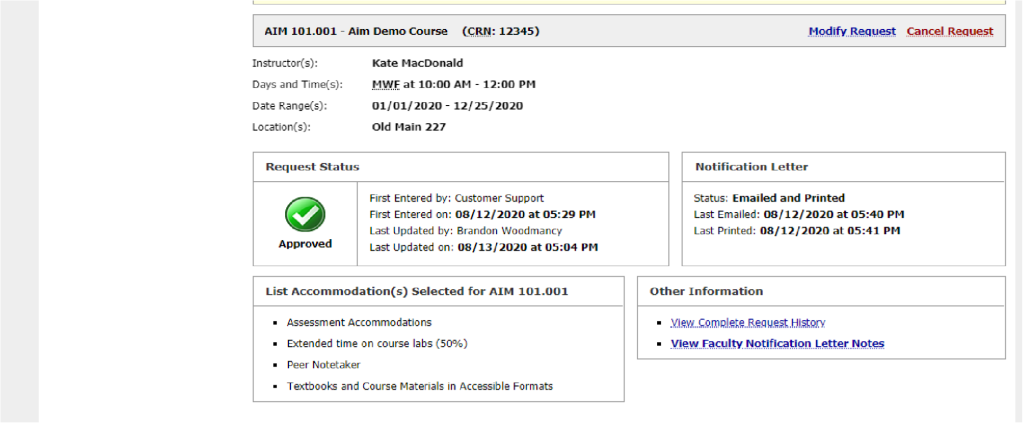
5. Return to “My Dashboard” to verify your Letter of Accommodation request was sent. Beside each class, you will see the word “Requested”. Also, you will receive a confirmation email to your RMC email account. Now that your instructors have been informed of your accommodations, you can schedule to take assessments proctored by the Office of Accessibility Resources. 

Screenshot of a course accommodation request page showing approval status for AIM 101.001. The DSO-approved request includes extended time on tests and note provision, officially noted in the Letters of Accommodation on 08/31/2020.

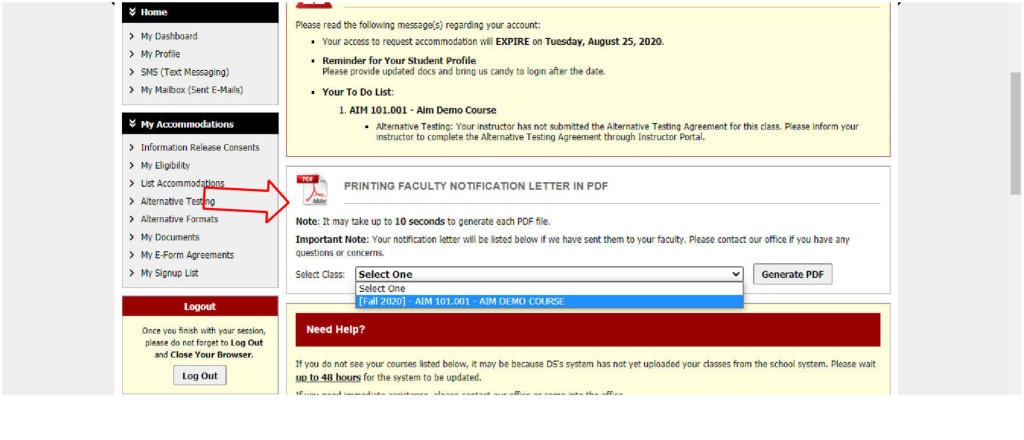
6. After you submit your accommodation request, you can also print a PDF version of your Letter of Accommodation if you choose. To do this, navigate to your Dashboard. Scroll down to “Printing Faculty Notification Letter in PDF”.  Use the drop-down menu to select the class you for which you want to print a Letter of Accommodation. A PDF will be generated for you.

Screenshot of a web page with a dropdown menu for selecting a course to generate a Letters of Accommodation PDF notification letter for faculty. A red arrow points to the "Select One" option, streamlining the DSO's task.

*If you have any questions about requesting Letters of Accommodation through the DSO, contact the Office of Accessibility Resources at accessibility@rmc.edu or (804) 752-3152. We are here to help you!